
05 / 06 · Packaging Rollout & SKU Adaptation
Once the master packaging design is done, the next SKU doesn’t need to be a new creative project.
From the approved system I build new products, sizes and variants while keeping brand consistency, production safety and the visual unity of the family.
SKU extensionNew productsNew sizesMutations
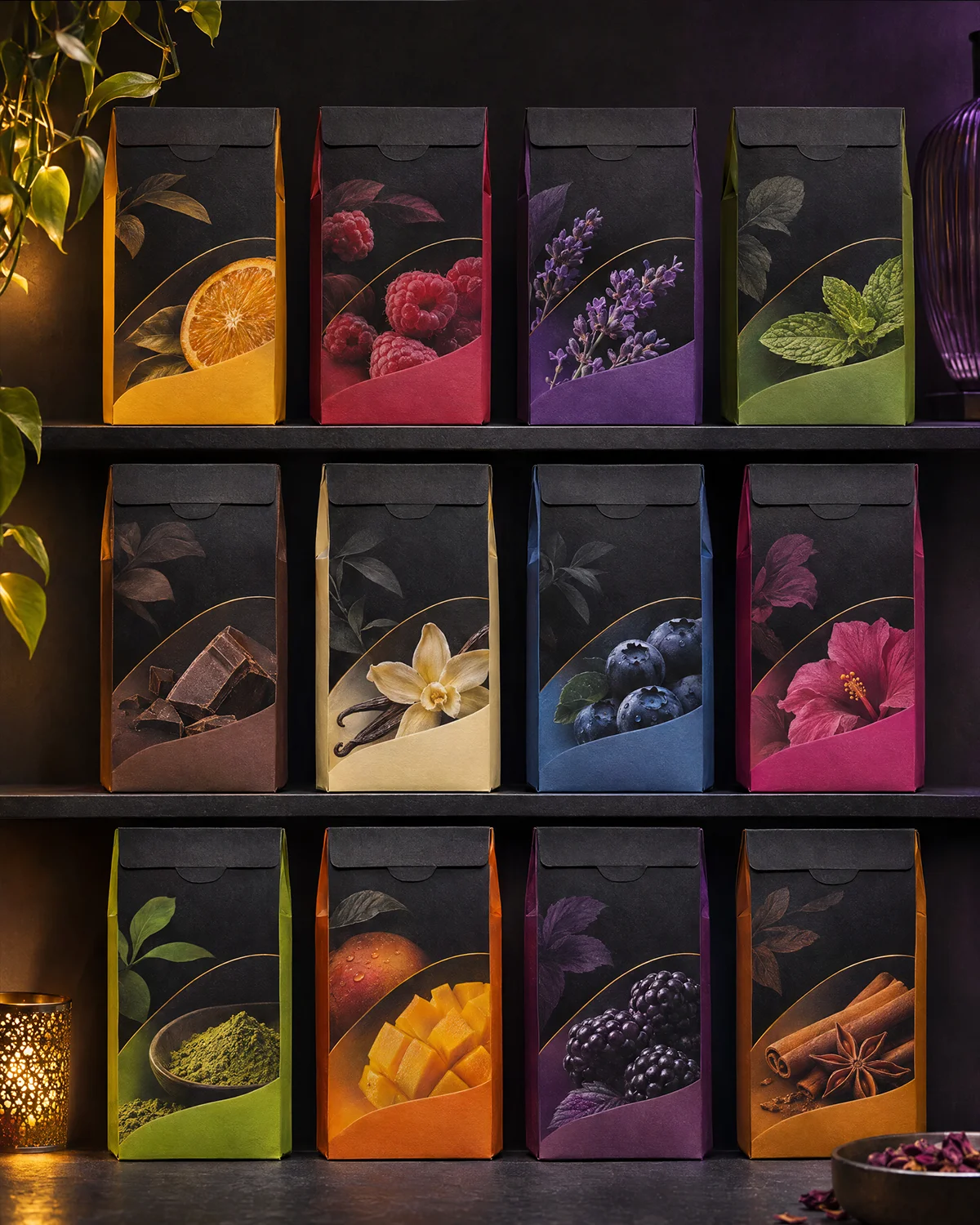
The master is done. What’s next?
A new product in the same series, with its own photo, color and messaging.
The system has to work on a new dieline or different proportions too.
Same family, but some elements must adapt to the new SKU’s specifics.
Different text lengths and mandatory information shouldn’t break the structure.
Adaptation ≠ copying
A new SKU belongs to the same family – but it isn’t the same product. A rollout isn’t about dropping a new picture into the previous box.
System constants & SKU variables
The elements and rules that connect the whole SKU family.
This is what makes each product clearly distinguishable.
The foundation of the process
First a full master is created on which every visual, informational and technical decision can be checked. The system gets approved – not just a nice front panel.
We don’t solve twenty problems in parallel. We solve one problem well, then carry it forward in a controlled way.
SKU review checklist
For every SKU I check not only whether it fits the family visually. The artwork review is a product check too.
A render or AI-assisted lifestyle image can look perfect while a small product detail doesn’t match the actual pack contents.
Localization & content
Longer headlines, larger legal text blocks, multiple languages, different mandatory market info – I plan for these in the original layout.
Localization shouldn’t turn into a redesign.
Product photos, renders, icons, illustrations, a new dieline, barcodes – I create some of these myself or organize their production.
AI-assisted lifestyle images based on 3D renders are possible, with manual retouching and a product-accuracy check. AI doesn’t get to “invent” the product.
Version control + Brand Vault
Every file name carries structured information: master date, item number, revision date, same-day version. The same data goes into the slug area as dynamic InDesign variables – so the PDF itself tells you which version of which SKU it is.
The Brand Vault isn’t an endless archive – it holds the current, approved, print-ready files.
An important boundary
A new design system may be needed if there’s a significant change in:
In that case I don’t force the new product into the old system. First we decide whether the same system really should continue.
Why it’s worth it
The product family clearly belongs together while every SKU gets its own character.
Master system + SKU checklist + version control. I won’t claim human error can never happen – the goal is for the system to take away as many chances for it as possible.
The fundamental decisions don’t have to be made again. Design energy goes into what’s actually new.
The more we automate, the less we can leave open to interpretation.
Packaging family systems
Product families where the system grows SKU by SKU – consistently.
How we work
If I take over an existing system, I first assess whether it’s fit to serve as a rollout base.
SKU list, sizes, languages, product data, EANs, mandatory texts, photos, manufacturer specs, dielines.
We define what’s missing – and create it, produce it or request it.
If a new or modified master is needed, we close that first.
Mutations according to the approved rules.
Visual, content and technical check against the SKU checklist.
Final production files for every approved SKU.
Current files go to the central storage.
Production coordination on request – with your printer or ours.
Who is it for?
Speed needs a foundation too
A rollout can be fast. But I don’t build systems on rushing.
Yes. First I review whether it’s suitable for building further SKUs. If there are issues with hierarchy, file structure or preparation, it’s worth fixing them before the rollout.
Even from a few products. The biggest benefit comes when we know in advance that the family will grow.
Yes, many product families need that. The system’s job is to keep the family resemblance alongside changing visual content.
3D renders, new photography, composites or AI-assisted visuals can all be used – but the result must represent the product accurately.
I design the placement and visual system, but the accuracy of legal content is the responsibility of the client or the relevant expert.
Yes, placing and technically handling EAN-8 / EAN-13 codes can be part of the artwork.
Technically yes, but it needs a dedicated data structure and a master optimized for automation – not something to force onto a layout afterwards.
Yes. I deliver production-ready files to your printer’s specifications and can coordinate proofs with them remotely. Full production through my own partners is available within the EU.
Next SKU?
If you have a working master design and new products are coming, let’s extend the system so the family gets stronger with every new SKU. Show me the master and the next products.
Part of one system